Questionnaire on Monday.
Fielded by Friday.
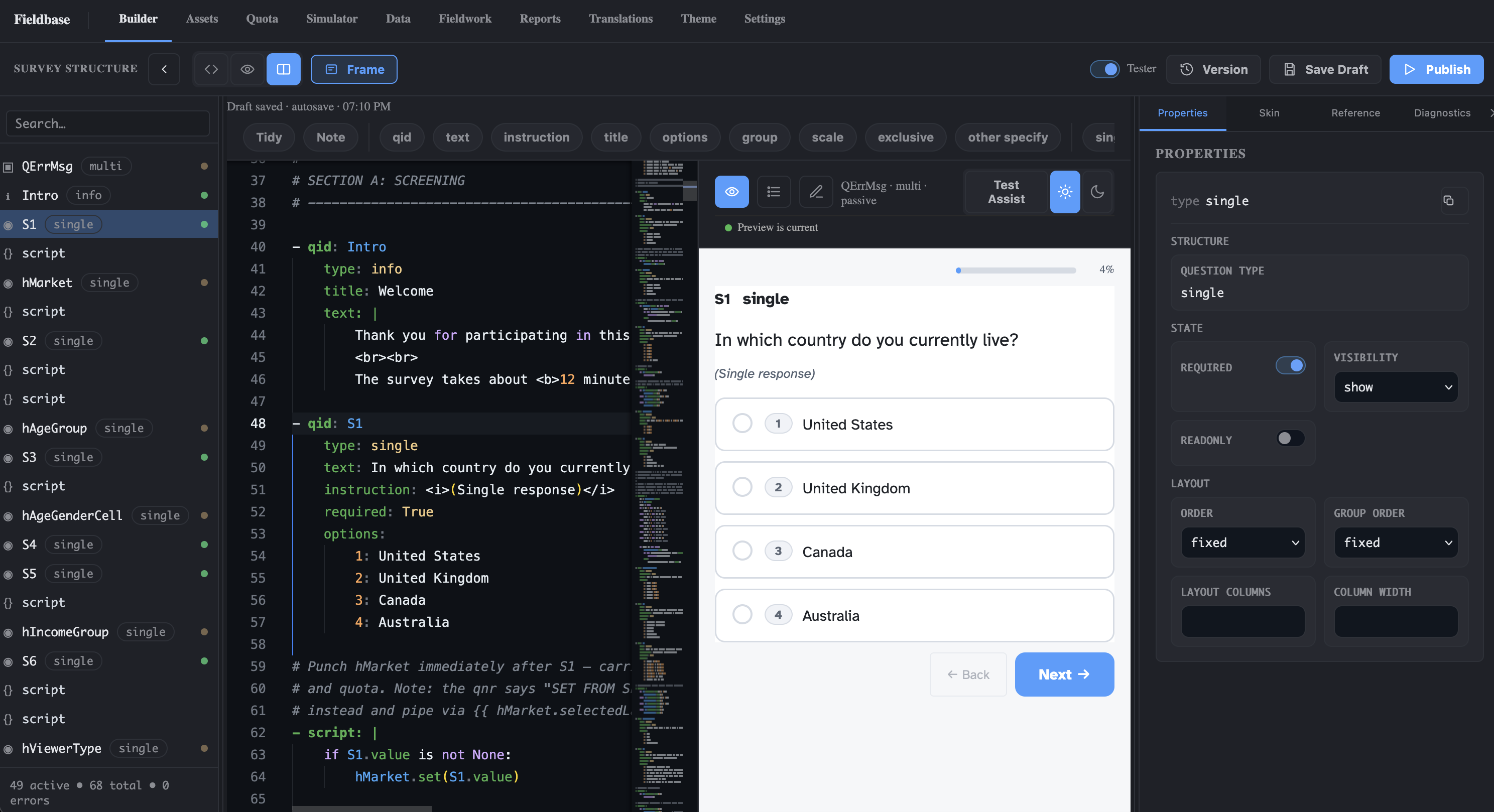
The client’s questionnaire becomes a working survey the same week. Your programmer reviews it instead of hand-coding it.
More studies per programmer, without the next hire.
- 01 60% less work per study. On average. The AI drafts from the client’s questionnaire and your programmer reviews it. See how ↓
- 02 Late client changes, on the record. Each edit arrives as a tracked change you accept or reject, logged in the project thread: who asked, who accepted, when. See how ↓
- 03 Tables without a tab house. Crosstabs with banners, significance letters and the Excel layout clients already read. See how ↓
- 04 Sell conjoint in-house. CBC and MaxDiff design, fielding and simulators in the same project, on the Team plan. See how ↓
Drop the questionnaire.
Review a survey instead of hand-coding one.
Upload the Word or PDF questionnaire. Fieldbase reads the question text, answer lists, programming notes and routing instructions, writes the survey code and runs the validator before you open it. Your programmer starts from a working draft with a live preview beside it.
- The file your client already sends. Word, PDF or pasted text. No template to fill in first.
- Readable code, not a black box. Plain YAML with Python-like logic, so your programmer can check and change any line.
- Validated before you see it. Malformed conditions and broken references are flagged at generation, not on the first test link.
The client changed Q4 again.
It takes a sentence, not an afternoon.
Late edits are where agency timelines slip. Describe the change in the AI chat and Fieldbase proposes the exact code change, scoped to the block it touches, with the validator already run. Nothing is applied until someone on your team accepts it.
- Ask in plain language. Add an option, reverse a scale, route one segment past a block.
- A tracked change, then you decide. Accept, refine or skip, like tracked changes in Word. The rest of the survey is never rewritten behind your back.
- One thread per project. Every change and who accepted it, readable by the programmer, the PM and the account lead.
 - qid: Q4
   type: multi
   options:
     1: Netflix
     2: Disney+
     3: Prime Video
+    99:
+      label: None of these
+      exclusive: True
+      anchor: True
Tables without a tab house.
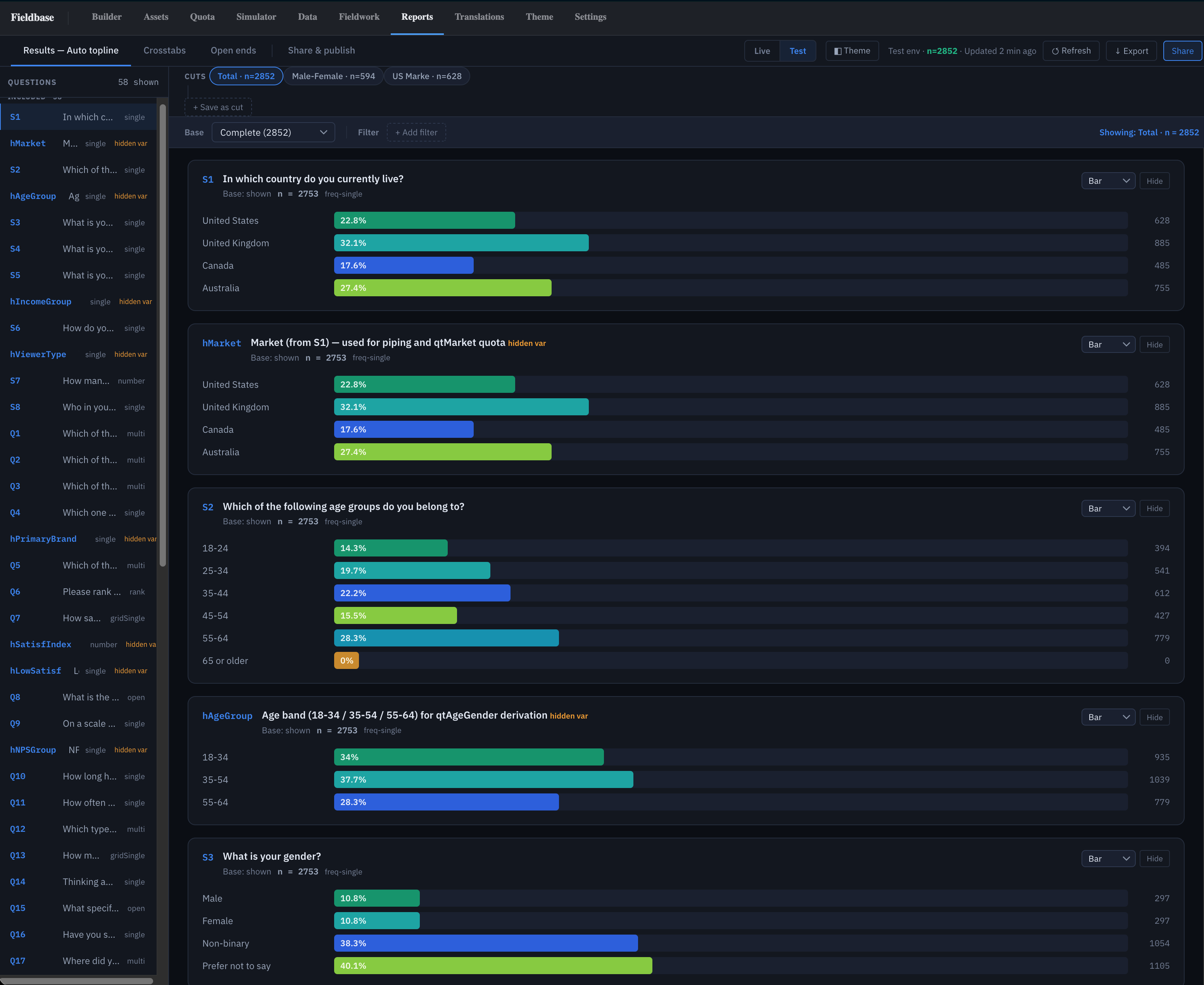
Topline and crosstabs from the first complete.
Reports read the live data from the first complete: an auto topline, crosstabs with banners built from your own questions, and significance letters, in the Excel layout clients already read. When the client wants the file, export SPSS, CSV, Excel or ASCII from one datamap.
- Topline and crosstabs built in. Column-proportions z-tests and an Excel export laid out the way the industry already reads it.
- SPSS-ready by default. A .sav, or .sps with .dat, with value labels and measure levels taken from the survey.
- Tracker waves stay identical. Saved export templates mean wave two lands in the same layout as wave one.
Sell conjoint in-house.
Design, field and simulate in one project.
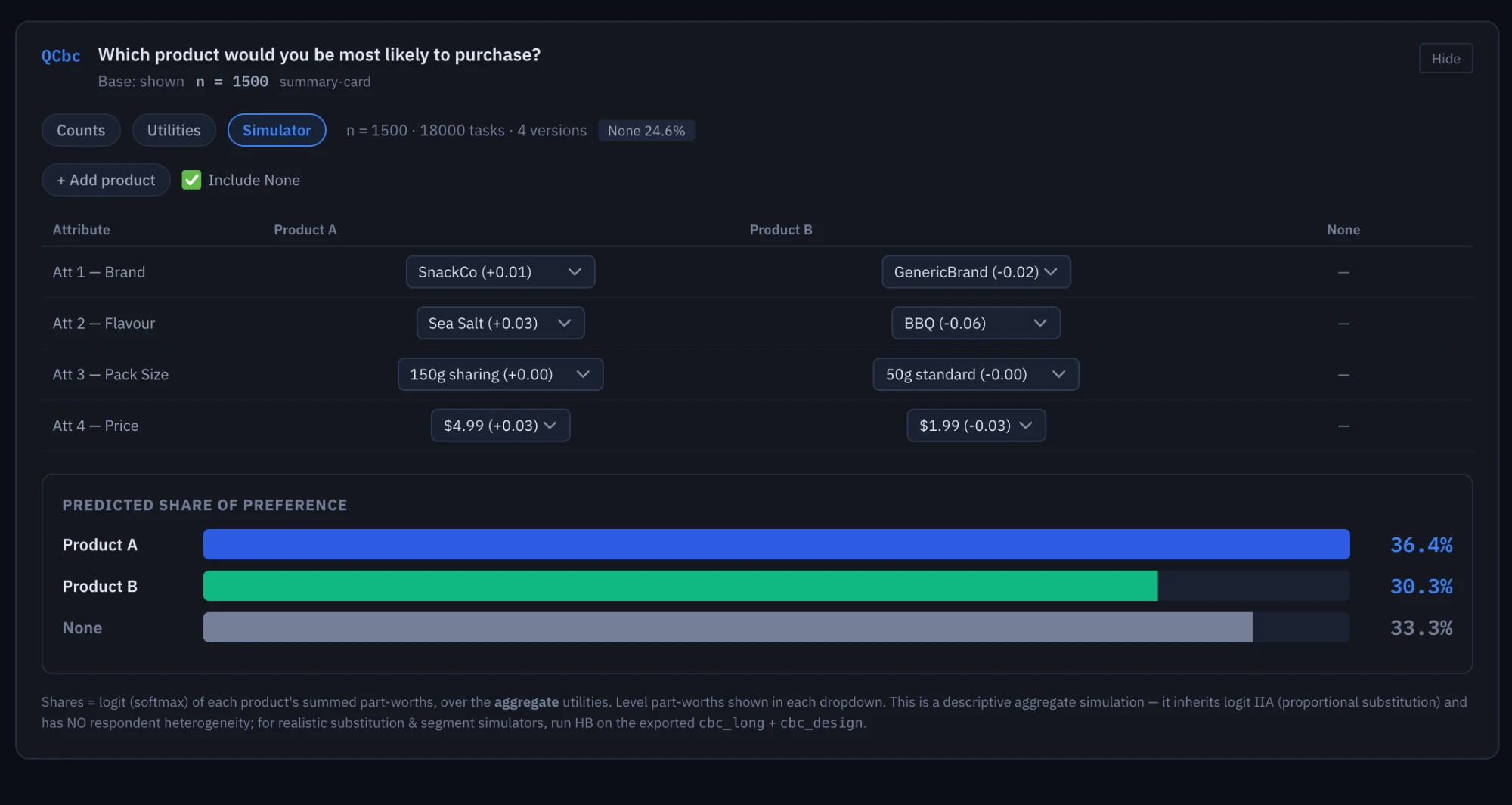
CBC and MaxDiff live in the same survey language as everything else. Upload the experimental design once, field it with the rest of the questionnaire, and open counts, utilities and a market simulator in Reports. No second tool, and no hand-off to a specialist vendor.
- Design in one line. Upload the design file to the project once, then reference it from the question.
- Utilities and a simulator. Counts, utilities and share-of-preference what-ifs for the client presentation.
- Files for your own models. Long-format CBC and MaxDiff exports if your analysts run their own estimation.
From questionnaire to first completes.
A typical first study in the Launch Cohort, programmed with our team alongside yours.
- Day 1
Upload and draft
Upload the questionnaire and walk through the AI draft with us. Mark what needs to change.
- Day 2
Review and edit
Your programmer works through the edits in the chat. The validator stays clean as you go.
- Day 3
Simulate and test
Run simulated respondents through every route and quota, then send test links to the client.
- Day 4–5
Field
Go live in the first language. Add the others as translation review signs off.
Start with one study you’re already selling.
No migration project. Your current platform keeps running while one real study runs on Fieldbase.
- 1 Pick a real study
A tracker wave or a standard U&A works best: real routing, real quotas, a client deadline.
You do this - 2 We programme it with you
Our team works beside your programmer on the first two questionnaires so the output matches your house conventions.
We do this - 3 Field and deliver
Same sample source, same deliverables. Compare the hours spent and the file you hand over.
You do this - 4 Decide at day 60
If it saved the hours, stay with a 24-month price lock. If not, you keep your data and your exports.
You do this
The honest answers.
Does the AI replace our programmers?
No. It replaces the hand-coding. Your programmer reviews a working draft, handles the difficult logic and owns the final code. The time saved goes into more studies per programmer, not fewer programmers.
What happens to our questionnaires and client data?
They are not used to train AI models. Uploads are processed securely and temporary processing data is deleted within 7 days. Data is hosted in the US today, with an EU region in Frankfurt coming soon. If EU residency is a requirement, say so when you apply.
Can it handle our complex studies?
Nested quotas, loops, piping, scripted routing, CBC and MaxDiff all live in the same survey language. When a study needs something bespoke, custom HTML, CSS and JavaScript run inside the survey at question, page or survey scope.
Our clients expect a specific data layout.
Every export comes off one datamap you can shape in the Datamap Designer. Save it as a template and every wave of a tracker exports in the same layout.
What does it cost once the cohort ends?
Team is $169 per user per month with 125,000 responses a year included, or less on annual billing. Cohort members keep their price for 24 months.
Don’t take the page’s word for it.
Run your next three projects free.
Up to 5,000 completes over 90 days, hosted in the US (EU coming soon). We programme the first two questionnaires with you; you programme the third with the AI. At day 60 we talk about staying, with a 24-month price lock.