A full translations tab
in every project.
Edit every language in a split-pane table against the master.
Hand off to your agency as XLIFF (memoQ, Trados,
Phrase all read it) or work with a reviewer in XLSX
if that's where they live. Either way, every file carries a
schema binding token so a stale handoff gets
caught, not merged. Draft a language in minutes with
AI auto-translate — it preserves
{{pipes}} and HTML and won't overwrite a string
you've already saved. Respondents switch with ?lang=
at runtime.
Split view for easy translation.
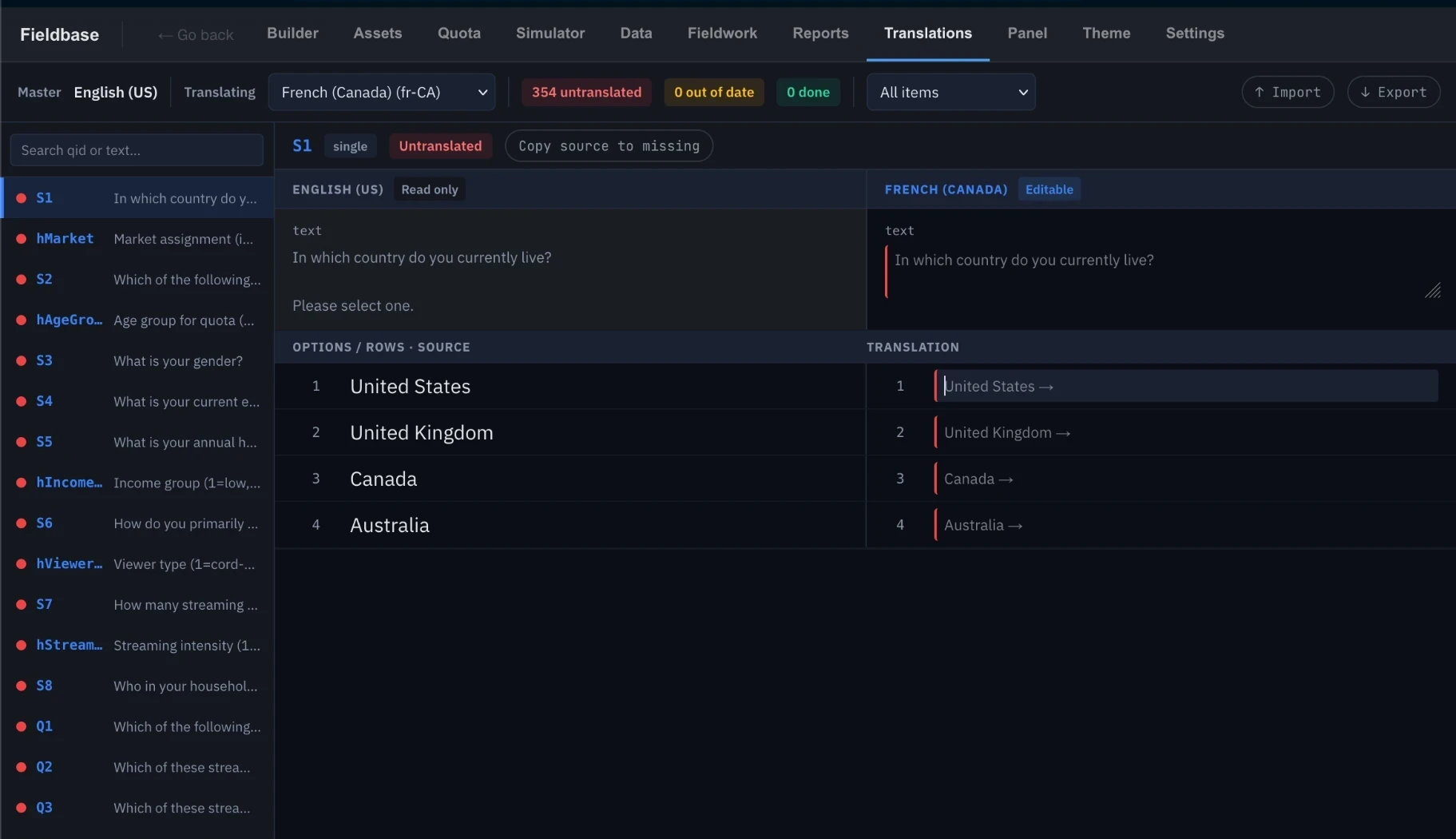
Master on the left. Target on the right. Status at a glance.
Pick a language and the whole survey opens as a table. English on the left, read-only. The target on the right, yours to type into. The counters along the top tell you what's left (354 untranslated), what the author changed since someone last touched it (0 out of date), and what's done — so you know whether you're starting fresh or wrapping up. On the far-left rail, a red dot sits next to anything still untranslated; click the next dot, no scrolling. Copy source to missing drops the English in as a placeholder for strings you'll come back to. Save and Next untranslated walk you through the queue without hunting.
XLIFF out. XLIFF in.
Schema-bound · a stale re-import is caught, not merged.
XLIFF is the primary format — the one agencies and CAT tools (memoQ, Trados, Phrase) read natively. XLSX is the fallback for manual-review teams that work in a spreadsheet. Both files carry a schema binding token — a checksum over the project, language, and the current source strings. When the file comes back, Fieldbase previews what would import against the current survey. Only keys whose source text still matches are applied; anything whose master has changed since the export is held out, flagged, and shown to you — nothing is saved until you click Import.
- XLIFF 1.2. The format every translation agency actually asks for. memoQ, Trados Studio, Phrase, XTM — hand them the file and they open it. No converter, no "can you send that as CSV instead."
- XLSX if your reviewer lives in Excel. Three columns —
key,source,target. Comes out of Fieldbase, goes back into Fieldbase. We only accept the workbook we generated, so nobody's fighting a formatting mismatch at midnight. - Schema-binding token catches drift. You exported Monday, the author edited
S3's title Tuesday, the agency sends it back Friday — the stale row is rejected on import with a clear "source has changed" note. Nothing silent, nothing merged. - Preview before save. Choosing the file only previews what would import — unchanged rows, new rows, and rejected rows all listed. Click Import only when the diff reads right.
<trans-unit id="S1.text">
  <source>In which country do you currently live?</source>
  <target state="needs-translation"/>
</trans-unit>
<trans-unit id="S1.r1.label">
  <source>United States</source>
  <target state="needs-translation"/>
</trans-unit>
3ad1556074b27772… S1.text source matches · import S1.r1.label source matches · import S3.text source changed since export · held Q19.text new key since export · skipped Draft a language in minutes.
Survey-aware · piping safe · never overwrites a human string.
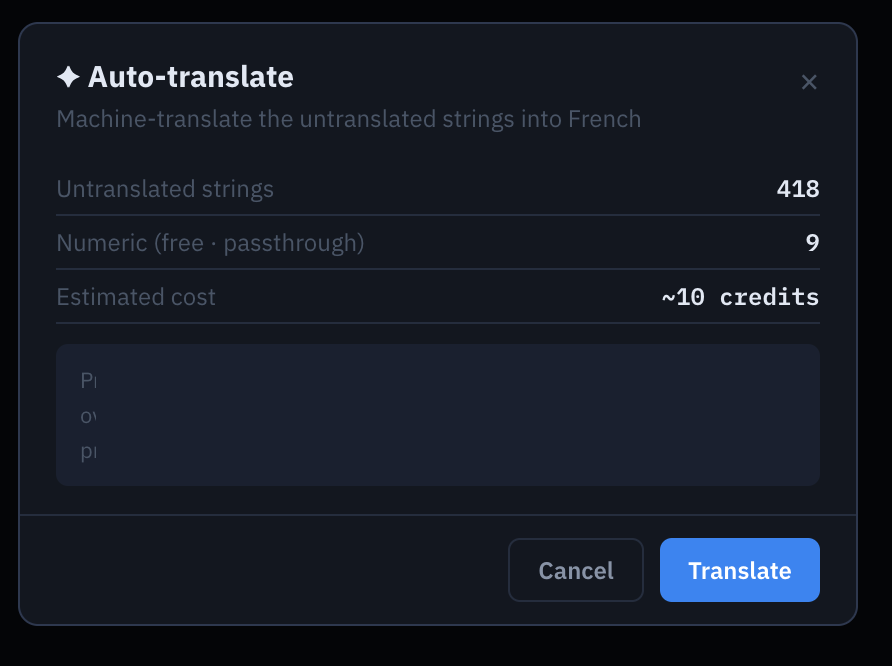
When you want a draft fast, hit Auto-translate.
It fills the empty rows with machine output you then review
in the same editor — no new tool to open, no round-trip.
Before anything runs, a modal tells you exactly what it's
about to touch (418 untranslated strings · 9 numeric
free) and what it'll cost in credits,
so there are no surprises on the bill. Every string the AI
writes lands flagged AI · review — easy to spot
in the table, easy to clear once you've read it. The one
line it won't cross is yours: anything you've already saved
by hand stays as it is. Piping like {{Q1}}
and HTML round-trip untouched; anything the AI mangles is
skipped and left for a human.
- Provider-agnostic. Point it at OpenAI (default
gpt-4o-mini) or Anthropic (claude-sonnet-5) with your own key. Same contract — if a new provider lands, swap the base URL. - Piping and HTML preserved.
{{Q1}},<strong>, inline formatting, and link markup round-trip untouched — the prompt is tuned for survey authoring, not generic prose. - Never overwrites. Only untranslated and out-of-date rows are candidates. A string you've already saved by hand (or reviewed) stays as it is — the AI pass can't quietly rewrite a signed-off wording.
- Flagged for review. Every AI-generated row carries an
AI · reviewtag in the editor and in exports. Reviewing simply clears the flag — the string you ship is the string a human approved.
72 languages. Zero setup.
Append ?lang= to any respondent link — the whole survey switches.
Every ISO code you'd expect is in — en-US,
en-GB, fr, fr-CA,
es, es-MX, de,
pt-BR, ja, ko,
zh-CN, ar, hi, and
60 more. There's nothing a respondent has to install or
pick. The link carries the language; titles, options,
validation messages, and progress-bar labels all render
in that language from the first screen. Pair with
per-language
fielding and you can field English today, start French
the moment review completes on Thursday, add Japanese next
week — each with its own Test · Live · Paused ·
Closed status.
- One URL param · no auth.
?lang=fr-CAon the link does it. No sign-in, no picker, no respondent-side anything. Panel partners just append the code to the links they already send. - Region variants supported.
frandfr-CAare different packs — ship one or both. Case doesn't matter; the loader normalises before matching. - English always available. If a pack fails to load the loader logs a warning and keeps the English fallback live. Validation messages render on the first paint, every time.
- Per-language fielding. Hold a language in Test while review runs; flip to Live the moment it's signed off. No re-publish, no code change, no pause of the other languages.
survey.example.com/s/abc123?lang=en-US → LIVE renders English survey.example.com/s/abc123?lang=fr-CA → LIVE renders French (Canada) survey.example.com/s/abc123?lang=ja → TEST internal only · falls back for public survey.example.com/s/abc123?lang=xx → FALLBACK unknown code · English served Labels translate. Codes don't.
The data layer is one language · the presentation layer is any language.
What the respondent sees gets translated. What the data file reads doesn't. Titles, help text, options, buttons, validation messages — all translatable. Row codes, variable names, qids, logic expressions — all the same across every language, so your SPSS file reads the same whether the respondent answered in French or Japanese. One crosstab, one quota table, one dataset. The editor only shows you the translatable side; there's no way to touch a code by accident.
- Codes are canonical.
row 1 · "United States"stays row 1 in every language; the French editor shows "États-Unis" on the right, butr1is the key in the data file. - One datamap, every language. Datamap labels can be master-only (one label across all languages) or per-language (if you want the variable label in French in a French .sav). Both choices save into the template.
- Validation messages too. Answer required, Pick at least N, card-sort and annotation messages all come from the
i18npack — change the French wording once; every project uses it.
S1.textQuestion titleS1.r1.labelOption labelS1.helpTextHelp textbuttons.nextButton textvalidation.requiredValidation messageprogress.labelProgress barS1Question idr1 r2 r3Option codeshMarketHidden variableQ1 == 3Logic expressionquota.cellQuota cell keypid-00031Project idOne translation pack, every project touchpoint
Translate once and it shows up everywhere a respondent might see it — the survey, the custom-code blocks, the validation messages, the progress bar, even the hold page they land on when their language is paused. Ship the file to your agency, pull it back in, flip the language from Test to Live, and the respondent link you already handed out starts rendering in that language. No republish, no re-key, no "which build did we send to the French panel again?".