Import data in.
Update in place.
Full CSV in for new respondents, or mid-field column updates by
respondentId for post-field coding and panelist
weights. Every import gets a label, a wave tag, and
schema-validation before anything hits the database.
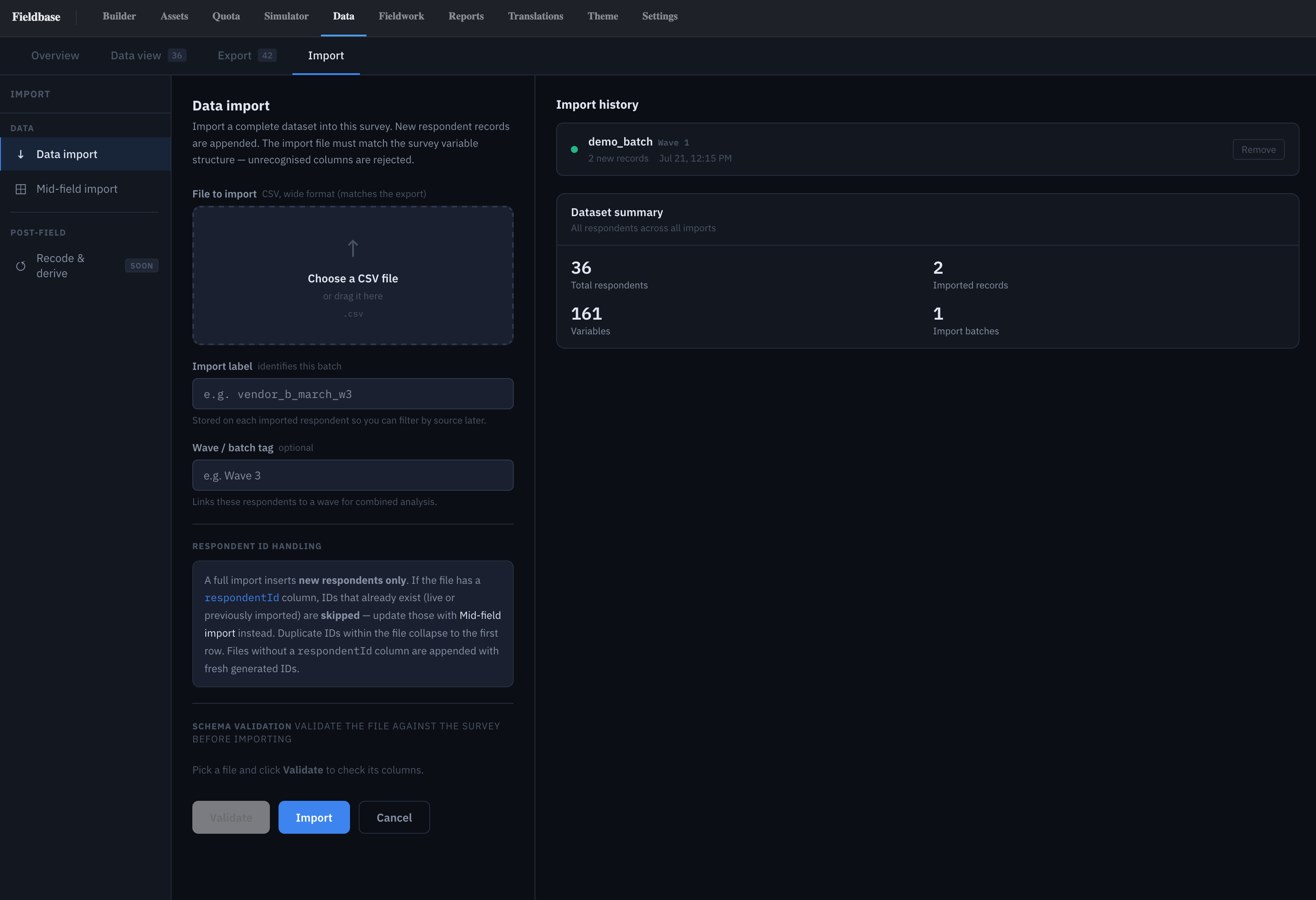
Two import modes
- Data import — upload a wide CSV, insert new respondents only.
- Mid-field import — update specific columns on existing respondents by
respondentId.
Both read the same canonical model as Export, so a CSV that came out of the Export wizard reads cleanly back in.
Full dataset import
Drop a CSV. New respondents only — safe to re-run a half-failed import without creating duplicates:
- Rows with an existing
respondentIdare skipped. - Duplicate IDs within the file collapse to the first row.
- Rows without a
respondentIdget a freshly generated one.
For panelist drops, pilot seeds, or historical data from a previous platform.
Mid-field update
Update specific columns on existing respondents by
respondentId. Column-scoped and non-destructive for
unrelated data. Common uses:
- Post-field coding — recoded open-ends land in
Q18_codeonly. - Panelist weights —
hWeightfrom the panel provider after fieldwork closes. - Back-office enrichment — CRM segment code against a known
respondentId.
Import label & batch tag
Every import carries two labels:
- Import label — stored on each imported respondent, filterable in Data view and Export (e.g. Pilot batch, Panel A seed).
- Wave / batch tag — optional, for cross-wave analysis in Reports and in the Data view's Source column.
Filterable in Data view and Export for cross-wave or by-source cuts.
Schema validation
Nothing writes until the schema validates. Validate runs the file against the live survey structure:
- Unrecognised columns rejected (not silently dropped).
- Code values outside the question's axis flagged.
- Type mismatches (text in a numeric, out-of-range dates) reported with row numbers.
A precise diff before you commit.
Import history
Every import logged: label, batch tag, filename, respondent count, imported-at, by-whom. Failed imports kept with their validation errors, so you can retry the same file after fixing the schema.
Dataset summary
Summary panel at the top of the Import tab:
- Total respondents — live + imported.
- Imported records — just the ones from this tab.
- Variables — total column count across the current datamap.
- Import batches — distinct wave/batch tags seen.
Click any number to filter the Data view down to that scope.
Recode & derive (SOON)
Post-field derived variables — net scores, bucketed numerics, combined codes — on the roadmap. Today the same work runs inline from a script block; the Recode UI will add a point-and-click layer on top of the same engine.