Follow up on every conjoint choice.
Know not just what — but why.
Attach follow-up questions to every CBC task — why did you pick this concept?, a confidence rating, an open-end in their own words. The follow-up rides inline on each of the N tasks without extra wiring, keeps the choice fresh, and surfaces in the Reports module alongside the aggregate part-worths and counts.
The follow-up appears the moment they commit.
Same screen, same flow — no separate page, no lost context.
Respondents see the choice task, pick one, and the follow-up question slides in right underneath — still looking at the concept they just chose. The why is captured while the trade-off is still fresh, not three screens later when they've forgotten what they were comparing.
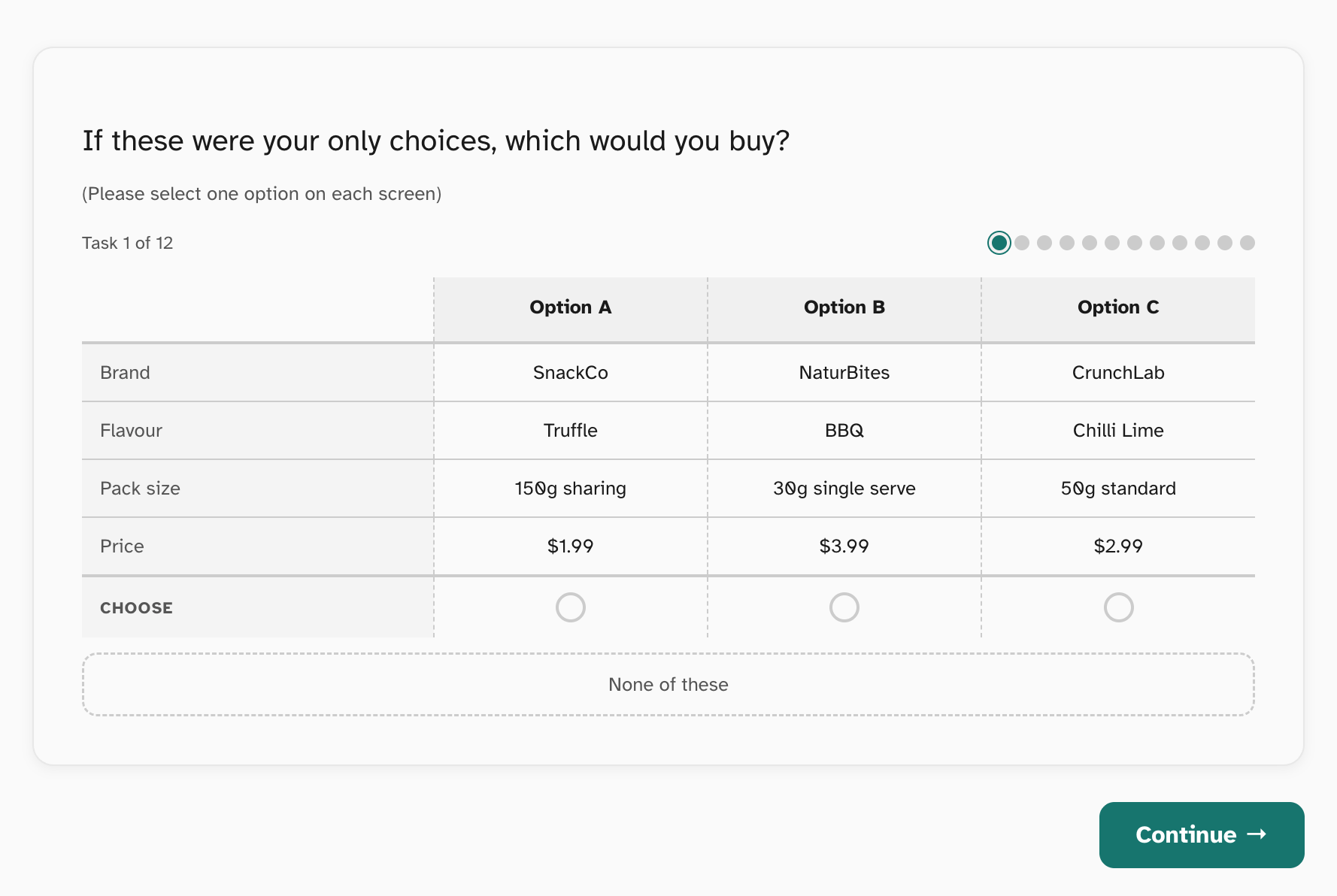
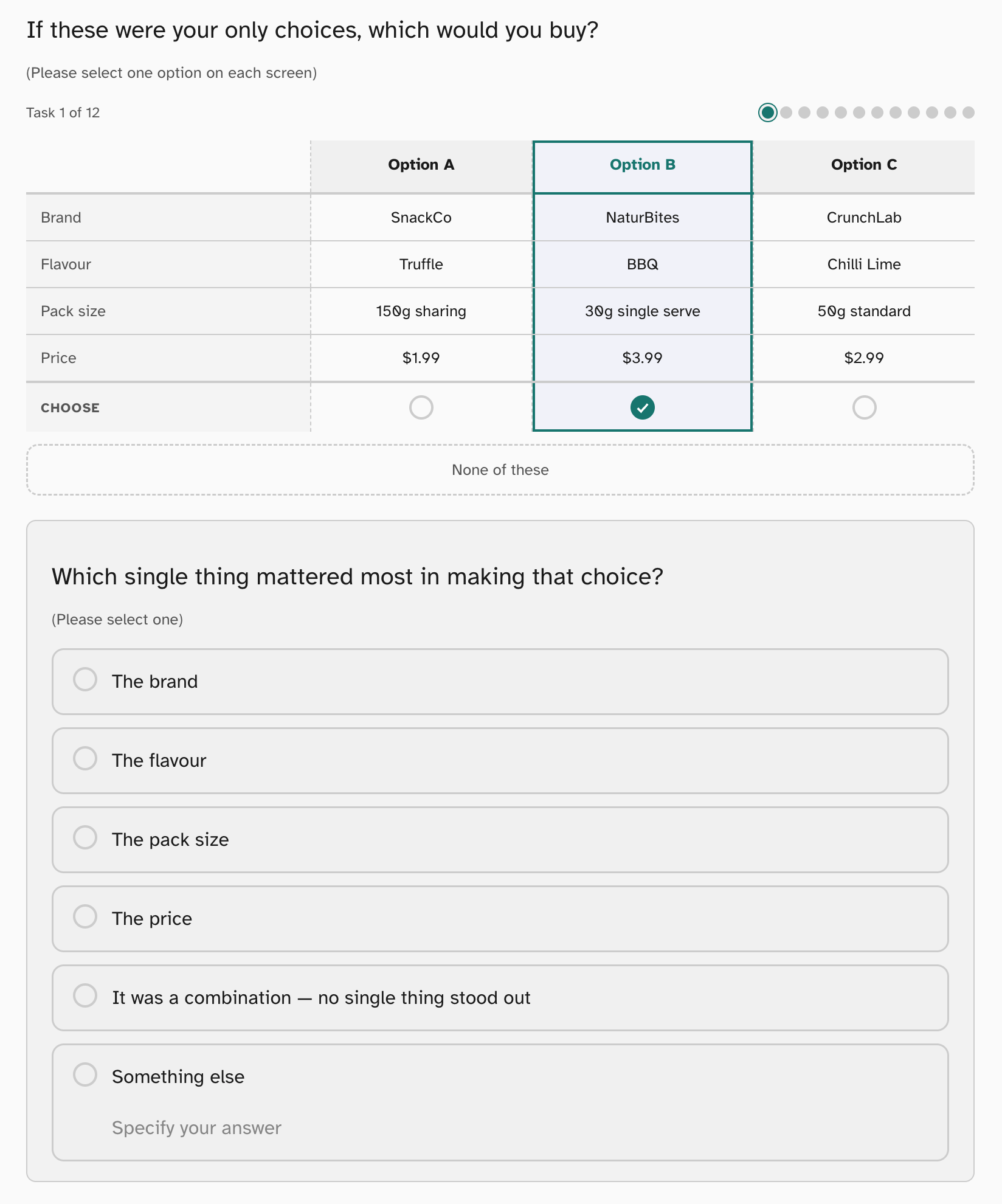
Any question type. Referenced by qid.
Author each follow-up like any other question — then list its qid on the CBC.
Follow-ups aren't a special type — they're ordinary
Fieldbase questions the conjoint references by qid.
That means the usual if: gates work (skip the
why when they picked None), the usual
option lists work, and the usual piping works. Any of these
can be attached:
- Open-end
type: open— Why this one? in their own words. Becomes the qualitative side-by-side in the open-ends tab of Reports. - Single-choice
type: single— the attributes in your design, Would you switch?, confidence bands. Instant tie-breaker for close calls in the utilities. - Rating
type: rating— 1–5 or 1–7 on how sure they are. Filters noisy respondents in analysis without throwing them out. - Number
type: number— at what price would you have walked away? Carries straight through to willingness-to-pay analysis.
# Conjoint module — reference follow-ups by qid
- qid: QChoice
  type: cbc
  text: Which would you buy?
  design: snack_cbc_v3
  versionSource: systemBalanced
  followUp: QWhy, QSwitch

# Each follow-up is its own question — fires after every task,
# gated by what they picked on that task
- qid: QWhy
  type: open
  text: Why this one?
  if: QChoice.selected != 0   # skip when "none"

- qid: QSwitch
  type: single
  text: Would you switch from your
         current product?
  if: QChoice.selected != 0
  options:
    1: Yes
2: NoOne block, N tasks, N answers.
No copy-paste, no divergent wordings between task 3 and task 11.
In most tools, "ask after every task" means pasting the
follow-up twelve times, numbering twelve variables, and
babysitting twelve copies of the same wording. In Fieldbase
you reference each follow-up by its qid on the
CBC — followUp: QWhy, QSwitch — and
the engine fires those same questions after every task,
with their if: gates applied per task.
cbc_long keyed by rid, qid and task, so a modelling script sees one tidy row per respondent-task-followup — ready to join on the chosen concept and version.
Why answers sit next to part-worths.
The number and the explanation on the same screen.
Follow-ups surface in the Counts and Utilities tabs of the CBC report, not in a separate open-ends inbox. You see which attribute drove the aggregate utility and which attribute respondents say drove their pick. When those two agree, you're confident. When they don't, you have something to investigate — and the open-ends alongside tell you where to look.
- Counts tab — Why mattered most appears as its own breakout under the CBC counts. Filter to chose Option B to see what the picker-mindset was.
- Utilities tab — utility estimates for each attribute level sit next to the share of respondents who named that attribute in the why-question. Fast sanity check.
- Open-ends tab — every open-end carries the
task, theoptionthey picked, and the attribute levels on that task. Click a quote, see the exact concept it was about.
| Share | Why mattered most | ||
|---|---|---|---|
| Option A — SnackCo · Truffle | 32% | The brand | 48% |
| Option B — NaturBites · BBQ | 41% | The flavour | 52% |
| Option C — CrunchLab · Chilli | 19% | The price | 37% |
| None of these | 8% | Combination | 44% |
The conjoint explains the what. The follow-up explains the why.
Aggregate part-worths are a beautiful summary of trade-offs —
and a lousy brief for a brand team that wants to know what's going
on in a respondent's head. CBC follow-ups close that gap in the
same instrument, same session. You get the modelled number
and the per-respondent explanation of it, both in one
dataset. The follow-ups export with cbc_long
alongside the task, the version, and the chosen concept, so
anything your statistician wants to join on later already fits.