Design the codebook.
Save as a template.
Column order, labels, widths, start positions, measure levels — the full layout for every export format (SPSS, CSV, Excel, ASCII), edited in a grid or as text. Templates lock the layout so trackers ship column-identical, wave after wave.
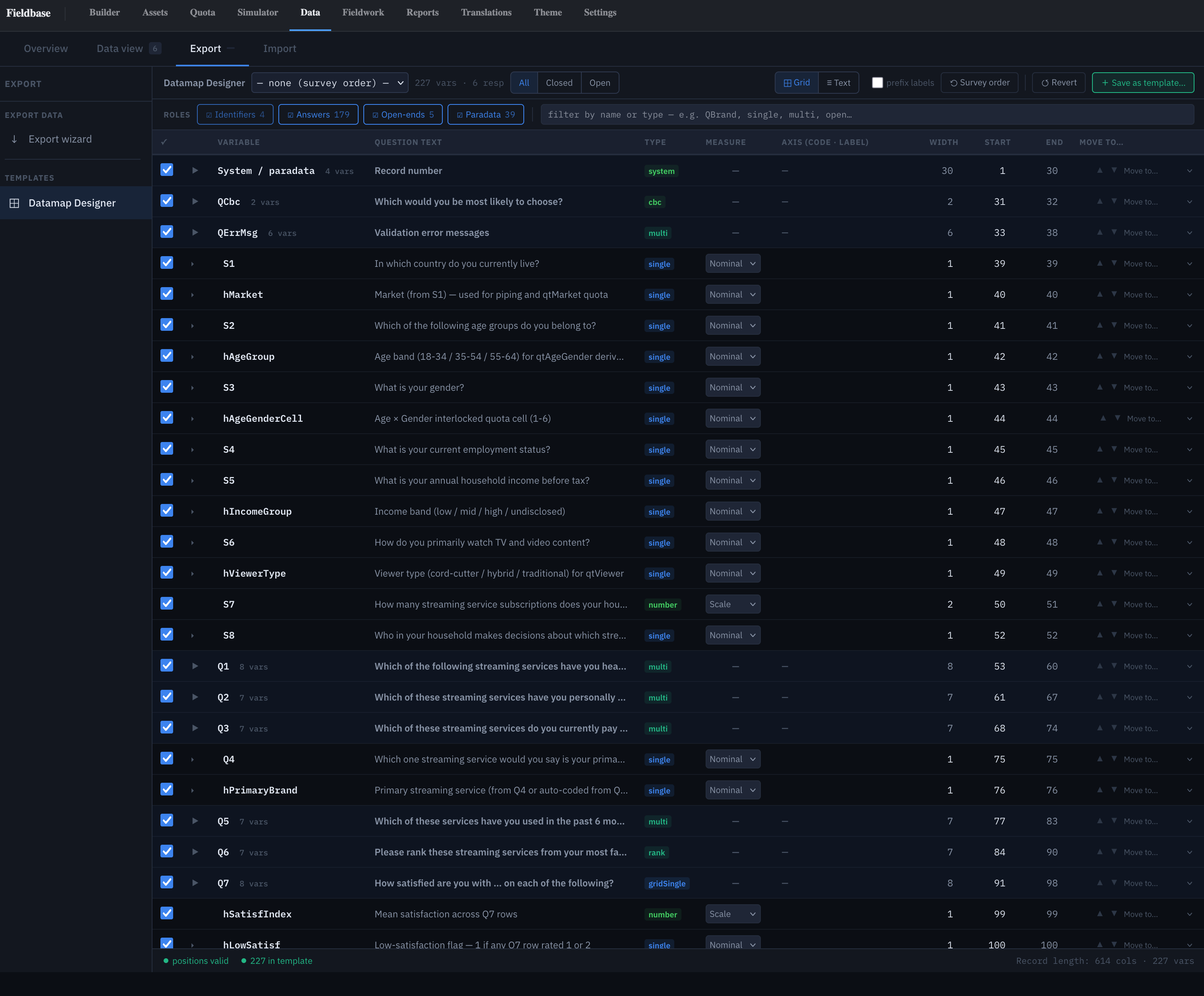
Grid or text, one model
The Datamap Designer sets column order, labels, widths, start positions, and measure levels for every export engine (SPSS, CSV, Excel, ASCII). Two editors on one model — a grid for scanning and clicking, a text view for cut-paste and version control. Edit in either; what you save in one shows up in the other.
Grid view
A row per exportable variable, columns for every attribute that drives the file:
- Variable — canonical name (
Q5r3,S2,hRegion). Rename the altlabel in place. - Question text — pulled from the survey, editable per export.
- Type —
single,multi,number,cbc,rank,gridSingle,system. Drives engine handling and the measure default. - Measure — Nominal / Scale / Ordinal, with per-variable override. See Measure levels.
- Axis — the code · label list that drives value labels in every format.
- Width · Start · End — fixed-width positions for ASCII; also consulted by SPSS .sav for long-string handling.
- Move to — target-picker reorder for single rows or a block selection.
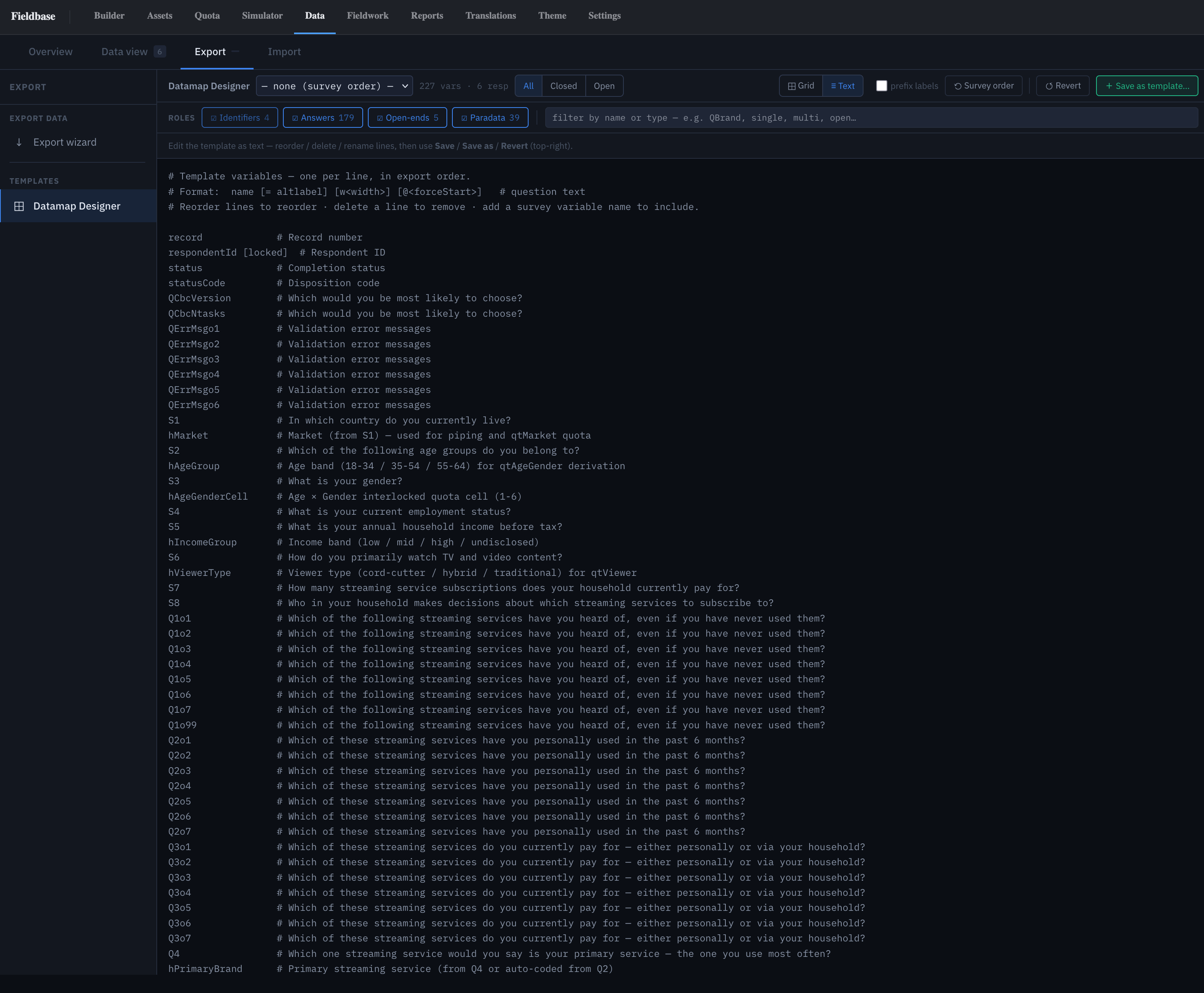
Text view
The datamap as plain text, one line per variable:
variable_name # Question text [= altlabel] [w<width>] [@<forceStart>]
Reorder by moving lines. Rename with = altlabel. Resize
with w40. Pin a start position with @320.
Comment with # …. Same save, revert, and save-as-template
actions as the grid.
Use it for bulk reorders, search-and-replace across a naming convention, pasting a layout from a client's spec, or diffing datamap changes in git.
Role filters
Four chips scope the view by variable role:
- Identifiers —
respondentId,pid,source, status fields. - Answers — questions and their sub-variables.
- Open-ends — free text and
otherSpecifycolumns. - Paradata — timing, pageTime, device, userAgent, screen size, backNav counts.
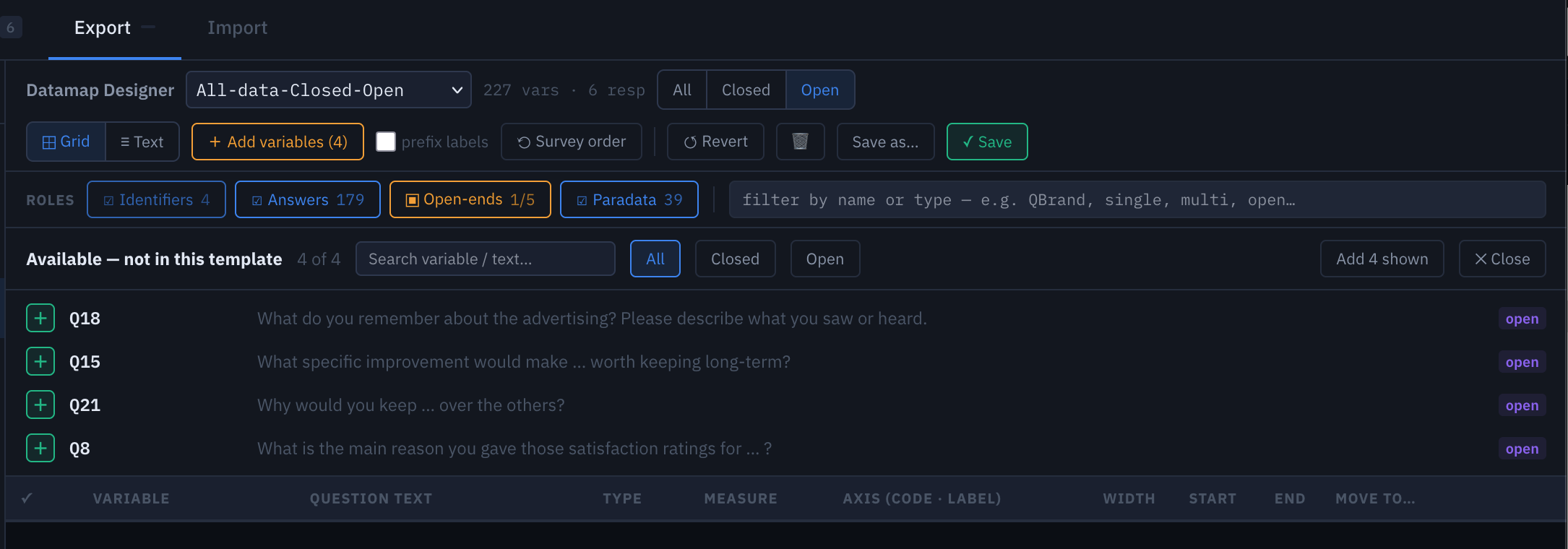
Chips carry counts (Open-ends 1/5): right-hand number is the total in the survey, left is what's in the current template. See Available → not in template.
Measure levels
SPSS procedures gate on measure level — correlation refuses a nominal, crosstabs want nominal, charts default off scale. Fieldbase picks a sensible default per type:
single,multi→ Nominalnumber,numeric→ Scalerank, orderedsinglewith a scale axis → Ordinal
Override per variable from the Measure column — a 1-to-10 purchase intent is Scale; a numeric region code is Nominal. Overrides save into the template and are respected across every format (SPSS .sav, the .sps syntax file, the datamap PDF).
Export templates
Save as… freezes the current layout, filter, role scope, and prefix-labels state into a reusable template. The Export wizard picks a template from a dropdown; every subsequent export off it ships column-identical.
The right unit for a tracker — same column shape every wave, stacked files line up without a reconciliation script.
Templates are per-project today; copy-template-between-projects is on the roadmap.
Available — not in template
Catches template drift before an export ships. When a template is loaded, the role-filter chip counts as N / total — Open-ends 1/5 means 4 open-ends exist in the survey but aren't in the current template.
Click the chip. The Available — not in this template
drawer opens at the top of the grid, one row per missing variable:
+ to add it, Add N shown to add the
whole filtered set.
Prefix labels
A toggle that prefixes every value label with its code in
parentheses — (1) Male instead of Male.
Needed for vendor datamap PDFs and for downstream pipelines that
only read the label string. Saved into the template.
Survey order & Revert
Three undo surfaces at different depths:
- Survey order — rebuilds the view in authored survey order.
- Revert — drops unsaved edits since the last save.
- Reset template (trash icon) — wipes the template to defaults. Confirm-gated.
None touch respondent data — the datamap only shapes how data is packaged.